Speak and send message to HTTP Server
- After speaking, text data will be sent to your server through HTTP.

- To do this, first you need go to Setting, choose HTTP POST protocol to setup your server
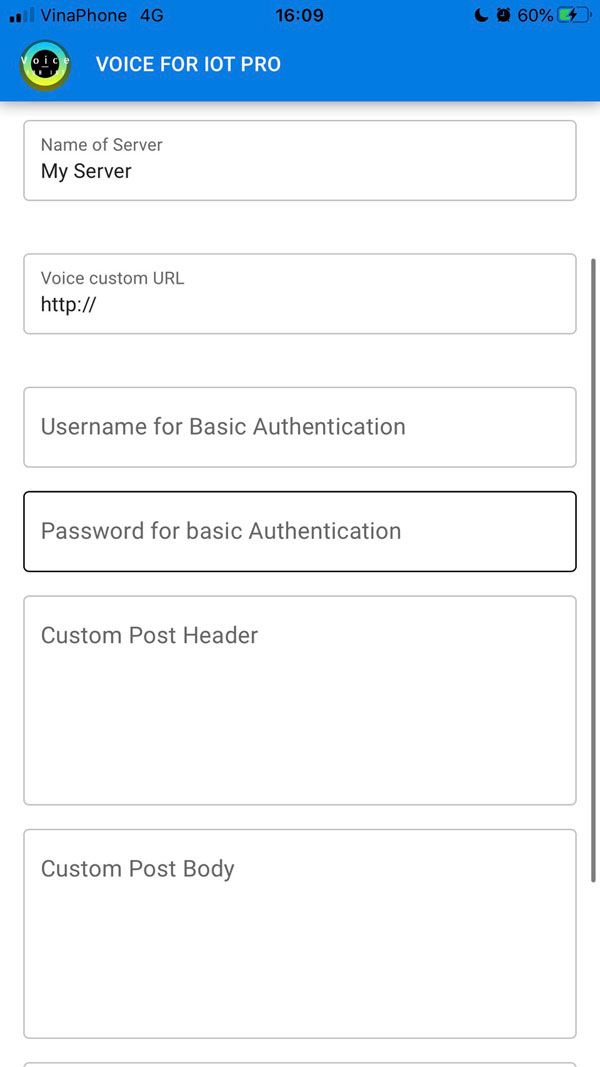
- Name of Server: Anything you want
- Voice custom URL: URL for posting voice command to, must support POST.
Data will be sent as
- {textData: 'your command'}
- Username and Password for Basic Authentication: In case you use basic authentication, put it here
- Custom Post Header: If you use any method of authorization with header,
just put here in json format with double quote, for example:
- {"Authorization": "Bearer xjkfkdjfdjffdf"}
- Custom Post Body: If you use are authorization with body, just put here
in json format with double, for example:
- {"username":"alex","password":"mycustompassword"}